


I like Substack.
Genuinely, I do.
Not just because it’s a nice place to publish articles and meet other writers—and not because of the enormous cheque I’m hoping they send me for saying nice things about the platform.
I like it because it feels as though it was actually built by people who understand writers. The more time I’ve spent using it, the more I’ve stumbled across little features that continue to back this theory up.
But—and I hope this doesn’t affect the size of said cheque—I do have to say this: when you’re first starting out, Substack can be an incredibly confusing place.
There are menus inside menus. Settings hidden in other settings. And some genuinely brilliant features tucked away in places you’d probably never think to look.
I wish somebody had pointed them out to me when I first started.
So, in the absence of that person, I suppose you’ll have to settle for me.
Here are three of my favourites.
1. Own Your Audience
One of the biggest mistakes bloggers make is assuming they’ll stay on the same platform forever. Maybe you will—I hope I do.
But platforms change. Companies get bought. Features disappear. Priorities shift. It’s impossible to know what the blogging landscape will look like in five or ten years’ time.
That’s why one of the very first things I looked for after joining Substack was whether I could export my subscriber list. Thankfully, the answer was yes.
It only takes a couple of clicks, and suddenly you’ve got something incredibly valuable: a copy of the audience you’ve spent months—or years—building.
Hopefully, you’ll never actually need it.
But I think there’s something reassuring about knowing it’s there.
After all, if you’ve spent years earning people’s trust, reading habits, and inbox space, it seems only fair that you should be able to take those relationships with you if you ever decide to move on.
It’s a small feature, but I think it says something much bigger about the platform.
Substack seems to understand that your subscribers aren’t really their audience.
They’re yours.
And I like that.
Here’s how to export your Subscriber list. (I recommend doing this every few months or so).
Step 1: From your Substack home page, click Dashboard in the left-hand menu.

Step 2: Open the Subscribers tab.
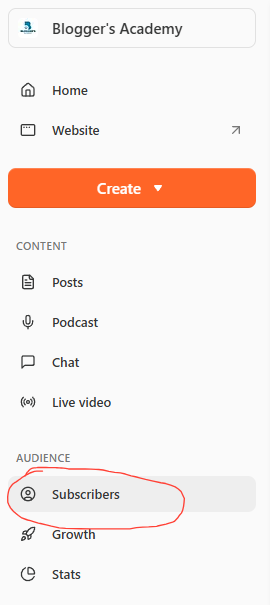
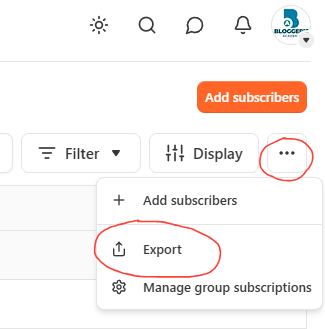
Step 3: Click the three dots in the top-right corner and select Export.
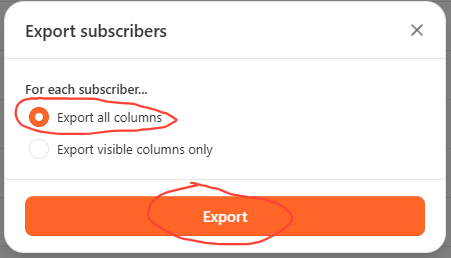
Step 4: Leave Export all columns selected, then click Export.
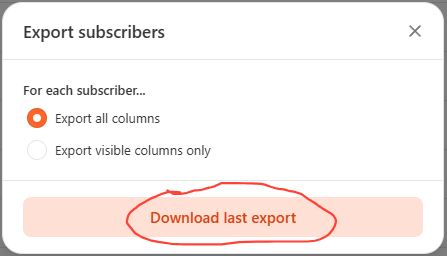
Note: THIS WILL NOT AUTOMATICALLY SAVE THE FILE. There is a Step 5!
Step 5: Once the export has finished—usually after a few minutes—the button changes to Download last export. Click it to actually download your spreadsheet.
That's it. You'll now have a spreadsheet containing your subscribers' details, stored safely on your computer. As I said, hopefully you'll never need it—but if the day ever comes when you decide to move platforms, you'll be very glad you took two minutes to do this.
That’s the first of the three tools I wish somebody had shown me when I started on Substack.
The other two—Control Your First Impression and Audience-Specific Content—are waiting inside Blogger’s Academy on Skool, where I walk through them with more examples, screenshots, and step-by-step tutorials.
If you found this useful, I think you’ll genuinely enjoy the Academy.
It’s where we cover the practical side of blogging: headlines, SEO, Substack growth, audience building, writing systems, and all the little things that make publishing online a lot less confusing than it was for me when I started.
Everything I teach there comes from building my own writing business over the last few years—growing an audience of more than 100,000 followers on Medium and 3,900+ subscribers on Substack. There’s no secret formula or overnight success story, just the lessons I wish somebody had taught me when I was getting started.
Join the Blogger’s Academy here:
And yes, if Substack ever does send that enormous cheque, I’ll be sure to let you know.

And here I thought you would share that large cheque with your readers. 😉